|

Prevent CD AutoRun
by Karl E. Peterson
May 2002 Issue 
Technology Toolbox: VB6, VB5
|
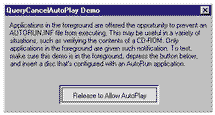
Q: Prevent CD AutoRun I'm customizing an installation application, and one of the steps it must take is to verify that the user has a copy of the previous CD. I'd like to somehow prevent Windows from triggering the AutoRun operation when I ask the user to insert the old CD. This would avoid all sorts of user confusion, and certainly make the newer setup appear that much more professional. A: A well-designed AutoRun app can add tremendous value to almost any CD-ROM. But AutoRun apps that pop up unwanted are irritating. You'd certainly want to disable this feature in the situation you describe. Windows offers two methods by which you can disable AutoRun functionality temporarily. On systems with the Internet Explorer 4 integrated shell installed (versions 4.70 or higher), Windows sends the foreground application a QueryCancelAutoPlay message when the user inserts a CD, if the root directory contains a file named Autorun.inf (see Figure 1).
QueryCancelAutoPlay is a message registered by the system, retrievable by any application using the RegisterWindowMessage API. The system only sends this notification to the top-level foreground window. This strategy allows the application that has the user's focus at the moment sole control over enabling AutoRun. Hook your main form's message stream using your favorite method, be it a third-party control such as MsgHook or your own code (or download HookMe.zip from my Web site for a generic drop-in module; see Resources). Retrieve QueryCancelAutoPlay's value by calling RegisterWindowMessage, an API that allows applications to obtain a custom message's value using a known string. When your form receives this message, respond with 1 to prevent AutoRun, or 0 to allow AutoRun (see Listing 2). As a side note, the SDK documents instruct you to return TRUE to prevent AutoRun. VB's intrinsic True often works in this situation, but not this time. This notification's designers used the hardcoded definition of TRUE rather than the more common "anything but zero" test. MSBasic has always considered any nonzero value to be True, even though the constant itself uses the bitwise Not False, or -1, for this value. With QueryCancelAutoPlay, only +1 is considered TRUE (and 0 is FALSE) in return. Earlier, I mentioned you can disable AutoRun in two ways. Windows employs two Registry keys to enable or disable AutoRun persistently for a class of drives or for specific drives (see Resources). Setting these keys is generally discouraged on systems other than your own, as there's no mechanism to restore them reliably to their previous value. Most systems meet the Shell version requirements for message-based AutoRun notification, so your best bet is to "fail gracefully" on systems that don't deliver. —K.E.P. Q: Load a Form By
Name A: In VB5 and VB6, you can use the little-known Add method of VB's Forms collection to accomplish this task: Public Sub Main()
Dim frm As Form
Set frm = Forms.Add("Form1")
frm.Show
End Sub
Note that I declared the frm variable to be typed as Form, not the more specific Form1. This prevents the use of IntelliSense for custom properties and methods exposed by your form(s), but the flexibility offered in this case likely outweighs that small inconvenience. —K.E.P.
About the Author |
|
Make a donation
today, to support maintaining this library of Classic VB Code code and articles. |

|
Copyright ©1995-2024,
Karl E. Peterson, All Rights Reserved Worldwide.
Nothing on this web site may be reproduced, in any form,
without express written permission.