|

Drag and Drop URLs
See how to accept dropped URLs from other applications.
by Karl E. Peterson
July 2002 Issue 
Technology Toolbox: VB6, VB5
|
Q: Accept URLs Using
Drag-and-Drop I'd like to allow users to drag a link from Internet Explorer into certain controls on my VB form. How can I offer this in a way that provides both appropriate feedback to the user, and allows me to know the precise URL being dropped? A: An often overlooked, and certainly under-appreciated, method offered by VB forms and controls is OLE drag-and-drop. When the user drags something from most Microsoft applications (including from Internet Explorer), the application packages that something in an OLE DataObject. Your application can then examine this DataObject as the user drags it over your form or controls, and can offer feedback to the user indicating whether you'll accept it being dropped. I've always found the most flexibility in taking direct control over operations such as this. Set the OLEDropMode of the objects that accept drops to vbOLEDropManual. With this setting, VB fires the associated object's OLEDragOver event whenever the user drags a DataObject over the object. You can test the DataObject in the OLEDragOver event to see if it contains data you're interested in. For a URL, use the DataObject's GetData method to retrieve its raw text contents.
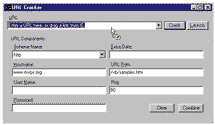
The component that packages the DataObject initially also sets what "effect" the user sees when over an OLE drop target (see Figure 1). If you don't find what you're looking for in the DataObject when OLEDragOver fires—in this case, a URL—set Effect to vbDropEffectNone and return from the event. If the DataObject appears to contain something of interest (a URL), your first instinct might be to return vbDropEffectCopy as the desired Effect. However, this might not be appropriate in some cases. How you set Effect determines what feedback the user receives. But you can't set Effect to a value not set initially by the DataObject's packager. OLE's IDropTarget interface offers one type not exposed by VB's type library: DROPEFFECT_LINK, which has a value of 4. You can test for this type specifically, or you can test the text itself to see if it "looks good" (see Listing 1). The Effect parameter is a bitfield, and you can't set it to values not turned on already, so the easiest answer is to leave it alone as long as the DataObject seems to contain appropriate data. —K.E.P.
About the Author |
|
Make a donation
today, to support maintaining this library of Classic VB Code code and articles. |

|
Copyright ©1995-2024,
Karl E. Peterson, All Rights Reserved Worldwide.
Nothing on this web site may be reproduced, in any form,
without express written permission.