|
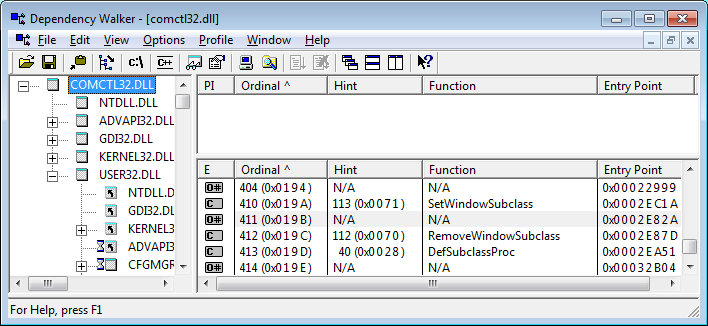
Way back in the dark ages, when comctl32.dll version 4.72 shipped with Windows 98 and Internet Explorer 4.01, Microsoft slipped an absolute gem of a tool into it. They provided a native means of subclassing windows that automatically handled the issues related to improper teardown. But, I hate to say, they played the typical Microsoft games, and didn't document these fabulous calls. It wasn't until they shipped Windows XP, many years later, that these four functions were actually documented. Until then, they were only exported by ordinal, and indeed even today only three of the four are exported by name. Okay, so what functions are we talking about? Here ya go:
Note how I've used Aliases to point at the ordinal export for each of these functions. In XP, that's not necessary for any but #411 which still isn't exported by name, even in Windows 7! If you don't use the ordinal aliases, these functions will fail in Windows 2000 and all 9x versions.
The key to getting really excited about this set of functions will hit you pretty quick when you try this sample. With this technique, you can set as many hooks as you want, without any fear of unhooking them in the wrong order. The sample demonstrates this by using individual classes to track on different tasks, as well as dumping all the messages directly into the form itself. I think you'll be excited by the possibilities.
What's In This Sample?
There are two modules you'll need to include in any application in which you want to use this method of subclassing. The MHookXP.bas module contains the routines you'll call to establish and destory hooks, and also the callback routine that Windows will direct the messages to in place of the hooked window's default message handler. The IHookXP.cls module contains the simple, one-method interface you'll use to redirect message handling from the standard BAS module callback into whatever object you want to handle events for any given window.
CHookMinMax.cls
Used to monitor WM_GETMINMAX messages, and restrict the ability of your user to resize your window at will. May be used to set either minimum or maximum dimensions for a window. Raises GetMinMax event to client, which may then set any legitimate values, which are then passed back to Windows. Maximum will be enforced even if user punches the Maximize button on your form's toolbar.
CHookSnapEdge.cls
Used to mimic the functionality of my SnapDialog sample, where a form is snapped to the edge of whatever monitor it's over whenever the user drags it to within a specified number of pixels from the edge. Achieves this effect by monitoring WM_WINDOWPOSCHANGING messages.
CHookMouseEvents.cls
This class provides the mysterious MouseEnter, MouseHover, and MouseLeave events, as well as a few bonus features like when the user clicks the 4th or 5th buttons on a 5 button mouse. It also provides a collection based scheme whereby you can add and remove windows to monitor just as you would to an ordinary collection. All events are raised with the associated hWnd so you can determine which control is under the mouse.
CHookMouseWheel.cls
Provides MouseWheel events, both vertical and horizontal, for any window that doesn't handle it natively. As Windows has evolved, the base classes that VB controls inherit from have slowly added scrollwheel support. But Windows passes the WM_MOUSEWHEEL message on up the parent chain when this isn't the case. So, one class can now monitor for any mousewheel activity that isn't already being responded to.
Be sure to watch this page, as I'll no doubt be occasionally adding more handlers to the mix!
This sample, or the one from which it originally derived, was published (or at least peripherally mentioned) in the following article(s):
- Hooking the Mouse, Classic VB Corner, VSM Online, July 2009
- Subclassing the XP Way, Classic VB Corner, VSM Online, July 2009
- Reacting to the Mousewheel, Classic VB Corner, VSM Online, August 2009
This sample uses the following API calls:
Module Library Function CHookMinMax.cls kernel32
user32RtlMoveMemory
IsWindowCHookMouseEvents.cls kernel32
user32RtlMoveMemory
TrackMouseEventCHookMouseWheel.cls kernel32
user32RtlMoveMemory
GetKeyState
GetSystemMetrics
IsWindow
SystemParametersInfo
WindowFromPointCHookSnapEdge.cls kernel32
user32RtlMoveMemory
GetMonitorInfo
GetSystemMetrics
IsWindow
MonitorFromWindow
SystemParametersInfoMHookXP.bas comctl32 DefSubclassProc (#413)
GetWindowSubclass (#411)
RemoveWindowSubclass (#412)
SetWindowSubclass (#410)MMainXP.bas comctl32 InitCommonControls MMainXPmouse.bas comctl32 InitCommonControls Don't see what you're looking for? Here's a complete API cross-reference.

Please, enjoy and learn from this sample. Include its code within your own projects, if you wish. But, in order to insure only the most recent code is available to all, I ask that you don't share the sample by any form of mass distribution. Download HookXP.zip, 58Kb, Last Updated: Friday, July 24, 2009
The following resources may also be of interest:
- HookMe - Native subclassing technique for VB5/6. Extremely clean.
- HyperLabel - UserControl that provides hyperlink capabilities to either text or images; highlights based on when mouse enters and leaves.
- MouseEvent - Full control of the mouse through code, including mousewheel.
- SnapDialog - Snap dialogs to the edges of screen. Supports multiple monitors and taskbar avoidance. Uses native subclassing.
- SysInfo - Catch Windows device notifications, system settings updates, and power status.
- Tray - Add your application's icon to the taskbar's notification tray (systray) properly. Updated for VB6 with native subclassing.

|
Make a donation
today, to support maintaining this library of Classic VB Code code and articles. |

|
Copyright ©1995-2024,
Karl E. Peterson, All Rights Reserved Worldwide.
Nothing on this web site may be reproduced, in any form,
without express written permission.