
|
 Description
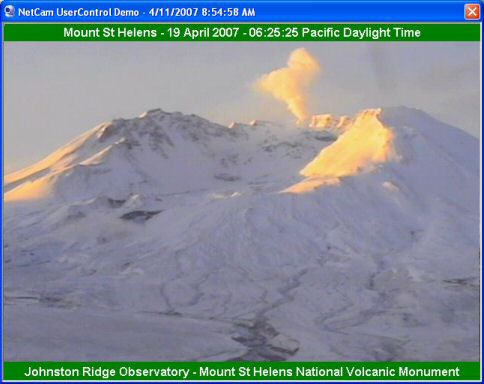
Here's a nifty little widget you can drop right into your VB5 and VB6 projects. It's written to demonstrate the asynchronous download capability of Classic VB UserControls, by periodically downloading an image from the internet, comparing it's bits to the previous download, and updating the onscreen display whenever the image has changed. Please note that there is a conditional constant defining which version of VB it's running under -- you must change this value as appropriate. I haven't tried this in VBA, but if you were to compile it to an OCX it'd probably work there as well.
' Set this conditional constant
' to False if you're using this
' in a VB5 project.
#Const VB6 = True
There are actually a number of interesting things to be learned from this sample. Perhaps foremost however is just how simple VB5/6 make it for you to download files asynchronously from the Internet! The technique used here will be useful for just about anything you need to quick-grab that doesn't require credentials.
You may also find the BorderStyle and Appearance property handling to be of interest, if you ever create your own UserControls. These are some tricks I picked up back in the old CCRP days. You may set the Appearance property to Flat, 3Dsunken, or 3Draised, and the BorderStyle options are None, FixedSingle, and Raised3D. Makes for some interesting options!
Bonus Material
Ever wondered whether an array was initialized or not? Here's a really simple routine that totally avoids error-trapping by examining the associated SAFEARRAY structure. We pull this of by first wrapping the array variable within a Variant (happens automatically as you pass it to this routine), and then peeking through its descriptor a bit:
There's also a really slick routine, first published by Brad Martinez, that can load an image into a StdPicture object directly from memory. This allows things such as reading graphic image from the internet, or a resource file, as a series of bytes and transforming those to a Picture without ever needing to write to disk first. In other words, you can also use it to load GIF or JPG images straight from a resource file!
Anyway, this is kind of a fun one. I've used it to create a good handful of funky little utilities. Two of my favorites are a Mt. St. Helens screensaver and an I-5 traffic cam monitor for my local region. I'd enjoy hearing how you use it.
This sample hasn't been published anywhere except here on this website, but first rights to such publication are jealously guarded - you have been warned. <g>
This sample uses the following API calls:
Module Library Function NetCam.ctl kernel32
ole32
olepro32
user32GetTickCount
GlobalAlloc
GlobalFree
GlobalLock
GlobalUnlock
RtlMoveMemory
CLSIDFromString
CreateStreamOnHGlobal
OleLoadPicture
GetWindowLong
SetWindowLong
SetWindowPosDon't see what you're looking for? Here's a complete API cross-reference.

Please, enjoy and learn from this sample. Include its code within your own projects, if you wish. But, in order to insure only the most recent code is available to all, I ask that you don't share the sample by any form of mass distribution. Download NetCam.zip, 14Kb, Last Updated: Tuesday, April 10, 2007
The following resources may also be of interest:
- NetGrab - Shows how to use the AsyncRead method of VB5/6 UserControls to download anything to memory or file.

|
Make a donation
today, to support maintaining this library of Classic VB Code code and articles. |

|
Copyright ©1995-2024,
Karl E. Peterson, All Rights Reserved Worldwide.
Nothing on this web site may be reproduced, in any form,
without express written permission.
